How to Play Supreme Duelist Stickman 2-Player Mode
| Name | How to Play Supreme Duelist Stickman 2-Player Mode |
|---|---|
| Downloads | 86 |
| Price | FREE |
| Rating |
★
★
★
★
★
0/5
(0)
|
| Author | |
| Updated |
Supreme Duelist Stickman’s 2-player mode needs no internet, no second device: two people share one screen, each with a joystick on their own side, battling directly against each other.
If you’ve been searching for how to play Supreme Duelist Stickman with 2 players and can’t find a “connect” button anywhere, don’t worry, you haven’t done anything wrong. This game’s 2-player mode is local, played on the same device, not matched online like other PvP titles. We’ll show you exactly where to tap, how to hold the device so two people don’t bump elbows, and a few tips so you’re not constantly getting knocked out by the person sitting next to you.
- How does 2-player mode in Supreme Duelist Stickman work?
- How to enter 2-player mode in just a few steps
- How do you control your character in 2-player mode?
- Tips for beating the person sitting next to you in 2-player mode
- Can you play 2-player on PC or through an emulator?
- Does 2-player mode require an internet connection?
- Conclusion
How does 2-player mode in Supreme Duelist Stickman work?
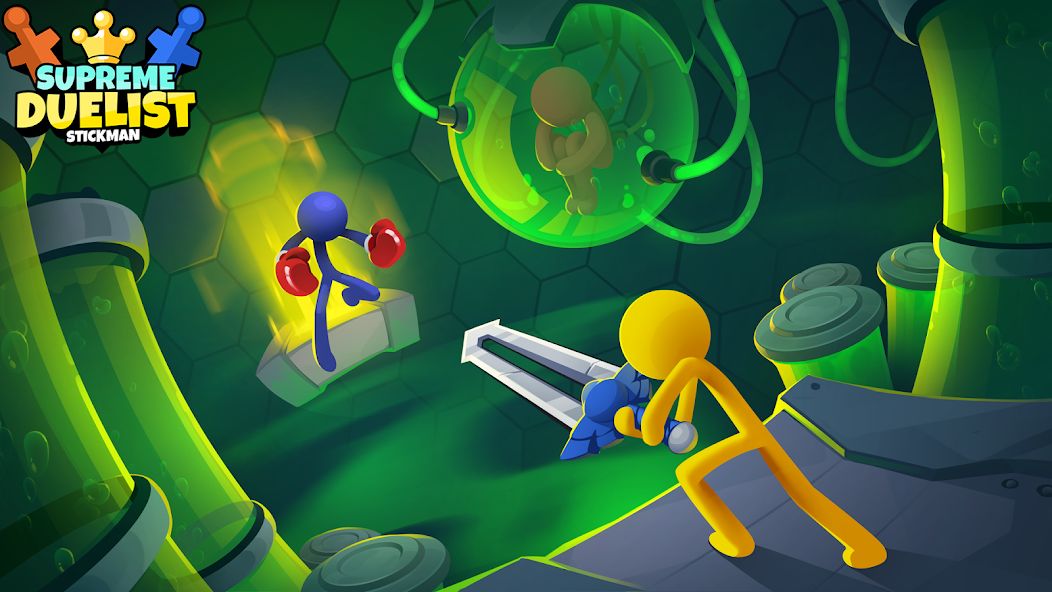
Two people play on the same phone or tablet. Once you enter 2-player mode, the screen displays two virtual joysticks, one on each side, left and right, with each person holding their own side and controlling their character. Whoever drains the opponent’s health first, or knocks them off the platform first, wins.
This mechanic is confirmed on legitimate download sites like Uptodown and the game’s community wikis. Here’s something we want to say plainly: a few articles online claim 2-player mode “connects via Bluetooth,” but that information doesn’t match how the game actually works in its current version. Just think of it simply as one device, two people, two joysticks, no network needed.
How to enter 2-player mode in just a few steps
The process is quick and not hidden anywhere deep. Follow this sequence:
- Open Supreme Duelist Stickman up to the main menu screen
- From the mode list, select 2 Player (next to 1 Player and Survival)
- Each person picks their character and weapon on the selection screen
- Tap start, lay the device flat on a table, with each person sitting on one side
- Hold the joystick in front of you and start fighting
One small hardware note: since the two joysticks sit at the edges of the screen, playing on a larger screen like a tablet feels far more comfortable than on a small phone. On a smaller screen, both players easily end up bumping hands, especially during those moments fighting to push each other off the edge.
How do you control your character in 2-player mode?
The entire game uses just one joystick per player, with no separate punch or jump buttons. Your character automatically swings their weapon in the direction you push the stick. Pull the stick up to jump, release it at the right moment to trigger your weapon’s special move, and hold it down to raise a shield (if Energy Shield is enabled).
It sounds simple, but this is exactly where skilled players separate from beginners. Since there’s no dedicated attack button, the timing of releasing the joystick decides almost everything. Every weapon has its own special move triggered by releasing the stick, for example, a sword lunges forward in the direction you just released it. In 2-player mode, whoever gets used to their weapon’s release timing will consistently beat the other, even if both players are complete beginners.
Tips for beating the person sitting next to you in 2-player mode
We’ve picked up a few worthwhile tricks from local battles. Your number one priority should always be knocking the opponent off the platform, since it’s much faster than grinding down their health bar entirely. Go for weapons with strong knockback and take advantage of the map’s edges.
A few more things worth remembering:
- Pick a weapon that suits your hand’s timing, don’t just chase the coolest looking one if it’s hard to control. The game has around 66 weapons as of May 2026, a number that keeps growing with every update, so try a few and settle on one or two you’re comfortable with
- Watch out for environmental hazards like lava or water on enclosed maps, pushing your opponent into one is an instant win
- Play around with the settings before a match. Toggling Gravity, Instant KO, or Energy Shield completely changes how you fight. Turning off gravity leads to hilarious floating fights, while turning on Instant KO makes every match come down to one decisive move
- Don’t stand still. Ragdoll characters lose balance very easily, so keep moving constantly to dodge your opponent’s knockback
If you want the full weapon and skin collection ready to go so both of you can freely experiment instead of grinding to unlock each one, you can check out the Supreme Duelist Stickman mod version we’ve compiled.
Can you play 2-player on PC or through an emulator?
Yes, but there’s something to consider. You can install Supreme Duelist Stickman on PC through an emulator like LDPlayer or MEmu and select 2-player mode normally. The issue is that both joysticks still sit on opposite sides of a single screen, so two people have to split a keyboard or one uses the mouse while the other uses the keyboard, which feels a bit awkward.
In our opinion, for 2-player mode, the original experience on a phone or tablet is still the most comfortable, since touch controls suit the joystick mechanic well. PC is better suited for playing solo when you want a large screen and a responsive mouse and keyboard.
Does 2-player mode require an internet connection?
No connection needed. 2-player mode runs entirely offline on the same device, so you can play anywhere without worrying about wifi or 4G. Beyond 2 players, the game also supports up to 3 and 4 players at once on a single screen, well suited for a large screen device like a tablet when hanging out with friends.
This is also exactly why we often recommend this game for casual get togethers, and as of version 4.0.5, local mode remains its strongest feature. No complicated setup needed, just open it up and both of you can start fighting right away.
If you want to see the full details about the game, its versions, and complete download links, head straight to our overview page:
View Supreme Duelist Stickman Details
Conclusion
Playing 2-player in Supreme Duelist Stickman is much simpler than most people think: go to the menu, select 2 Player, each person takes a joystick on either side of the screen, and battle right away on the same device, no internet needed. To win, get used to your weapon’s release timing and prioritize knocking your opponent off the platform. If you’re playing in a group, use a large screen device so both players don’t bump hands. Try toggling gravity and Instant KO settings, you’ll find this mode more addictive than you’d expect.
If you found this helpful, feel free to check out our homepage for plenty more games and apps:
Back to modlmh.com Homepage
Android emulator to run HOW TO PLAY SUPREME DUELIST STICKMAN 2-PLAYER MODE APK smoothly on PC.
Choose the source that fits your device
Play on PC with LDPlayer Android emulator · supports How to Play Supreme Duelist Stickman 2-Player Mode · Windows GET ↗